
Note
Go to the end to download the full example code.
Network Response#
In this tutorial we will cover how to do statistical significance testing for a ‘network response’. This is the average state/mode time course epoched around events of interest. We test is the response is significantly different from zero.
Get network response#
First we need to get the network response for each subject. This is the epoched state/mode time course averaged over trials, which would be a (subjects, states/modes, time) array. In this tutorial, we will simulate this.
import numpy as np

n_subjects = 20
n_time = 250
n_networks = 6

network_response = np.random.normal(size=(n_subjects, n_time, n_networks))

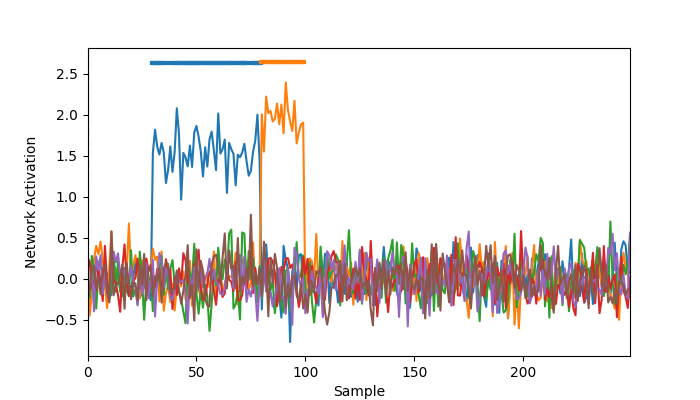
# Add non-zero network response for the first network for time points 30-80
network_response[:, 30:80, 0] += 1.5

# Add non-zero network response for the second network for time points 80-100
network_response[:, 80:100, 1] += 2
Statistical significance testing#
osl-dynamics has the analysis.statistics.evoked_response_max_stat_perm function for doing GLM permutation stats testing see if a value is significantly different from zero. This function uses the maximum test statistic to control for multiple comparisons across the time points and networks.
from osl_dynamics.analysis import statistics

pvalues = statistics.evoked_response_max_stat_perm(
    network_response,
    n_perm=1000,
    n_jobs=4,
)
print(pvalues.shape)
QUEUEING TASKS | Running permutations:   0%|          | 0/1000 [00:00<?, ?it/s]
QUEUEING TASKS | Running permutations:  10%|▉         | 98/1000 [00:00<00:00, 979.73it/s]
QUEUEING TASKS | Running permutations: 100%|██████████| 1000/1000 [00:00<00:00, 7795.58it/s]

PROCESSING TASKS | Running permutations:   0%|          | 0/1000 [00:00<?, ?it/s]
PROCESSING TASKS | Running permutations:   2%|▏         | 16/1000 [00:00<00:06, 154.85it/s]
PROCESSING TASKS | Running permutations:   4%|▍         | 42/1000 [00:00<00:04, 212.18it/s]
PROCESSING TASKS | Running permutations:   7%|▋         | 73/1000 [00:00<00:03, 250.87it/s]
PROCESSING TASKS | Running permutations:  11%|█         | 107/1000 [00:00<00:03, 279.29it/s]
PROCESSING TASKS | Running permutations:  14%|█▍        | 138/1000 [00:00<00:02, 288.23it/s]
PROCESSING TASKS | Running permutations:  17%|█▋        | 169/1000 [00:00<00:02, 294.49it/s]
PROCESSING TASKS | Running permutations:  20%|█▉        | 199/1000 [00:00<00:02, 292.12it/s]
PROCESSING TASKS | Running permutations:  23%|██▎       | 229/1000 [00:00<00:02, 288.46it/s]
PROCESSING TASKS | Running permutations:  26%|██▌       | 258/1000 [00:00<00:02, 281.23it/s]
PROCESSING TASKS | Running permutations:  29%|██▊       | 287/1000 [00:01<00:02, 283.73it/s]
PROCESSING TASKS | Running permutations:  32%|███▏      | 318/1000 [00:01<00:02, 286.67it/s]
PROCESSING TASKS | Running permutations:  35%|███▍      | 347/1000 [00:01<00:02, 286.63it/s]
PROCESSING TASKS | Running permutations:  38%|███▊      | 380/1000 [00:01<00:02, 290.02it/s]
PROCESSING TASKS | Running permutations:  41%|████      | 409/1000 [00:01<00:02, 288.57it/s]
PROCESSING TASKS | Running permutations:  44%|████▍     | 438/1000 [00:01<00:01, 287.36it/s]
PROCESSING TASKS | Running permutations:  47%|████▋     | 467/1000 [00:01<00:01, 286.56it/s]
PROCESSING TASKS | Running permutations:  50%|████▉     | 498/1000 [00:01<00:01, 291.58it/s]
PROCESSING TASKS | Running permutations:  53%|█████▎    | 528/1000 [00:01<00:01, 288.32it/s]
PROCESSING TASKS | Running permutations:  56%|█████▌    | 558/1000 [00:01<00:01, 287.49it/s]
PROCESSING TASKS | Running permutations:  59%|█████▊    | 587/1000 [00:02<00:01, 280.71it/s]
PROCESSING TASKS | Running permutations:  62%|██████▏   | 616/1000 [00:02<00:01, 270.66it/s]
PROCESSING TASKS | Running permutations:  65%|██████▍   | 648/1000 [00:02<00:01, 280.70it/s]
PROCESSING TASKS | Running permutations:  68%|██████▊   | 678/1000 [00:02<00:01, 282.35it/s]
PROCESSING TASKS | Running permutations:  71%|███████   | 709/1000 [00:02<00:01, 288.61it/s]
PROCESSING TASKS | Running permutations:  74%|███████▍  | 738/1000 [00:02<00:00, 284.67it/s]
PROCESSING TASKS | Running permutations:  77%|███████▋  | 771/1000 [00:02<00:00, 296.23it/s]
PROCESSING TASKS | Running permutations:  80%|████████  | 802/1000 [00:02<00:00, 296.57it/s]
PROCESSING TASKS | Running permutations:  84%|████████▎ | 837/1000 [00:02<00:00, 307.76it/s]
PROCESSING TASKS | Running permutations:  87%|████████▋ | 870/1000 [00:03<00:00, 313.52it/s]
PROCESSING TASKS | Running permutations:  90%|█████████ | 904/1000 [00:03<00:00, 319.26it/s]
PROCESSING TASKS | Running permutations:  94%|█████████▍| 938/1000 [00:03<00:00, 316.94it/s]
PROCESSING TASKS | Running permutations:  97%|█████████▋| 970/1000 [00:03<00:00, 317.15it/s]
PROCESSING TASKS | Running permutations: 100%|██████████| 1000/1000 [00:03<00:00, 290.83it/s]

COLLECTING RESULTS | Running permutations:   0%|          | 0/1000 [00:00<?, ?it/s]
COLLECTING RESULTS | Running permutations: 100%|██████████| 1000/1000 [00:00<00:00, 422089.56it/s]
(250, 6)
Let’s plot the group average network response with the significant time points highlighted.
from osl_dynamics.utils import plotting

t = np.arange(n_time)
group_network_response = np.mean(network_response, axis=0)
fig, ax = plotting.plot_evoked_response(
    t,
    group_network_response,
    pvalues,
    x_label="Sample",
    y_label="Network Activation",
)
Note, this function also has a covariates argument that can be used to account for confounds.
Total running time of the script: (0 minutes 3.809 seconds)